Customer Approval Bundle is an OroCommerce extension. It adds an approval procedure for each new customer registration.
A B2B organization uses this bundle to make administrator approval necessary before a new customer gets access to the storefront. Only approved companies can then get access, make orders, and use the commerce platform.
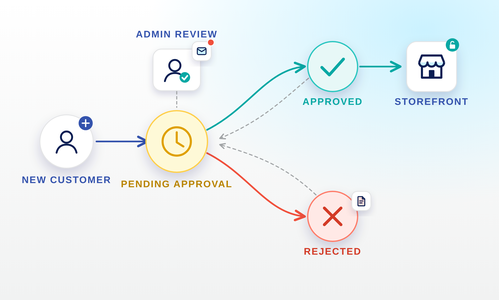
OroCommerce normally creates and confirms a new customer account automatically. This bundle puts each new customer into the Pending Approval step. An administrator must approve the customer before its customer users get access to the storefront. Until the approval occurs, the bundle does not send the confirmation email or the welcome email, and the customer users have no access. The bundle also sends email notifications to administrators, and reminders at a configured interval.
You can enable or disable the function for each organization in the system configuration. Thus you can start the approval procedure for some organizations only, in an installation that has many organizations.
This bundle is applicable to B2B commerce that needs an inspection of each new customer. Examples are trade account validation, credit checks, and a manual inspection of business credentials.
Functions
- Automatic approval workflow The bundle attaches the
customer_approvalworkflow to the Customer entity. The workflow starts automatically for each new customer. It controls the full approval sequence with defined steps and transitions. You do not have to start the workflow manually. - No storefront access before the approval The customer users of an unapproved customer cannot get access to the storefront. The message that they see depends on the step of their customer. A customer in Pending Approval gives a pending-approval message. A customer in Rejected gives a different message, and this message tells the user to contact support.
- No registration emails before the approval While a customer is in Pending Approval or Rejected, the bundle does not send the confirmation email, the welcome email, or the admin-registered welcome email. After the approval, the bundle sends the correct registration email to all customer users of that customer.
- Administrator notification for a new registration After a new customer registration, the owner of the customer receives an email notification. The notification tells the owner that a new customer needs approval. Thus no registration goes unseen.
- Reminders at an interval A cron command sends a summary email for each organization. The email records all customers of that organization that wait for approval. You can configure the interval and the recipient addresses at the global level, and give different values to each organization.
- Rejection with a cause An administrator can reject a customer and write the cause in the Rejection Reason field, which is a rich text field. The workflow keeps this text, and an administrator can read it at any time.
- Resubmit and Revoke transitions An administrator can send a rejected customer for approval again. The customer goes back to Pending Approval, and the bundle tells the administrator. An administrator can also remove the approval of an approved customer. That customer goes back to Pending Approval, and its customer users lose storefront access immediately.
- Back-office banners The customer page and the customer user page in the back office show these banners:
- A warning banner when the parent customer waits for approval
- An error banner with the rejection cause, when the parent customer is rejected
- An info banner on the customer page, when the function is disabled for the organization. This banner also shows the approval step that the bundle kept.
These banners show the approval step of the customer to the administrator.
- Control of the action buttons The bundle removes the standard OroCommerce Confirm and Send Confirmation buttons from the customer user pages when the parent customer is not approved. Thus an administrator cannot do the confirmation of a customer user before the approval of its customer.
- Predefined datagrid filter view The bundle adds a Pending Approval predefined filter view to the Customers grid in the back office. An administrator uses it to find all customers that wait for approval.
- Custom registration messages When a new customer needs approval, the bundle replaces the standard success flash message with a pending-approval message. If the email address belongs to a rejected customer, and the OroCommerce email enumeration protection is active, the bundle shows an error message. That message tells the user that the registration was unsuccessful, and to contact support. For a rejected customer, the bundle also prevents the duplicate email notification that OroCommerce normally sends.
- Feature toggle for each organization You can enable or disable the function in the system configuration, at the global level or the organization level. When it is disabled for an organization:
- The approval workflow does not start for new customers. Storefront access is not blocked. The bundle sends all registration emails, and it does not show the custom registration message.
- Workflow items that started before do not change. Each transition (Approve, Reject, Resubmit, Revoke) has a precondition. The precondition removes the buttons from the back office. Thus an administrator cannot change the approval step of a customer.
- A workflow applicability filter removes the workflow widget, which has the steps and the transition buttons, from the back-office customer page. The
WorkflowItemrow stays in the database. Thus all data comes back when you enable the function again. - The customer view page shows the approval step that the bundle kept, in an info banner. The banner also tells the administrator that the bundle does not enforce this step.
Thus you can start the function for some organizations only, and you do not have to change the code. The approval step also stays correct when you change the toggle while workflows are in progress.